How to Download Instagram Videos: Complete Guide
Instagram is full of entertaining Reels, useful tutorials, travel videos, recipes, and creative ideas. However, saving a video to your phone or computer is not always as straightforward as saving a regular file. If you want to download video from Instagram, understanding the available methods can help you choose the right option for your device.
In this guide, Nestvedia explains how to save Instagram videos, how online downloaders work, and what to do when a download fails. Whether you use an Android phone, an iPhone, or a desktop computer, you will learn the practical steps to follow. We will also explain the difference between saving a post inside Instagram and downloading a video to your device.
How to Download Video from Instagram Using an Online Downloader
An Instagram video downloader is an online tool that may help you download supported public Instagram videos using their links. Instead of installing additional software, you can usually open the tool in your browser.
Here is how the process generally works.
Step 1: Find the Instagram Video
Open Instagram and locate the public video you want to save. Open the post or Reel to make sure you have selected the correct content.
Step 2: Copy the Video Link
Tap the Share icon or the three-dot menu, depending on the Instagram interface available to you. Select Copy link if the option is available.
Step 3: Open Nestvedia
Visit Nestvedia and open its Instagram video downloader, if available. Look for the tool's URL input field.
Step 4: Paste the Link
Paste the copied Instagram URL into the input field. Next, select the download option provided by the tool and wait for it to process the link.
Step 5: Download the Video
If the video is supported and processing succeeds, follow the available download instructions. Depending on your browser and device, the file may appear in your Downloads folder or another selected location.
Helpful tip: An online Instagram video download tool may not support every post, Reel, or account. Private content, deleted posts, login restrictions, and changes to Instagram can prevent a link from working.
How to Save the Video from Instagram on Your Phone
The best way to save a video depends on whether you want to bookmark it inside Instagram or store a video file on your phone.
Instagram's built-in Save feature is useful for keeping track of posts. However, it does not normally download the original video file to your phone's gallery.
If you want an actual file, an online downloader may be an option for supported public content.
How to Save Instagram Videos on Android
Follow these steps to download a supported Instagram video on an Android device:
-
Open the Instagram app and find the video.
-
Tap the Share icon or menu and choose Copy link, if available.
-
Open your preferred mobile browser.
-
Visit Nestvedia and open its Instagram downloader, if supported.
-
Paste the copied link into the tool.
-
Start processing and follow the download instructions.
-
Open your phone's Downloads folder or Gallery to check whether the file has been saved.
If the video does not appear in your Gallery, check the Downloads folder first. Some Android browsers store downloaded files there instead.
How to Save Instagram Videos on iPhone
iPhone users can also use a browser-based method when a video and downloader are supported.
-
Open Instagram and locate the video.
-
Copy its link using the available sharing options.
-
Open Safari or another compatible browser.
-
Visit Nestvedia and access the relevant Instagram downloading tool.
-
Paste the video link and follow the on-screen instructions.
-
If a downloadable file is provided, select the download option.
-
Open the Files app and check the Downloads folder.
On iPhone, downloaded files may remain in the Files app rather than appearing automatically in Photos. If you want the video in your Photos library, use the available save or share option when supported.
How Do You Download Video from Instagram on a Computer?
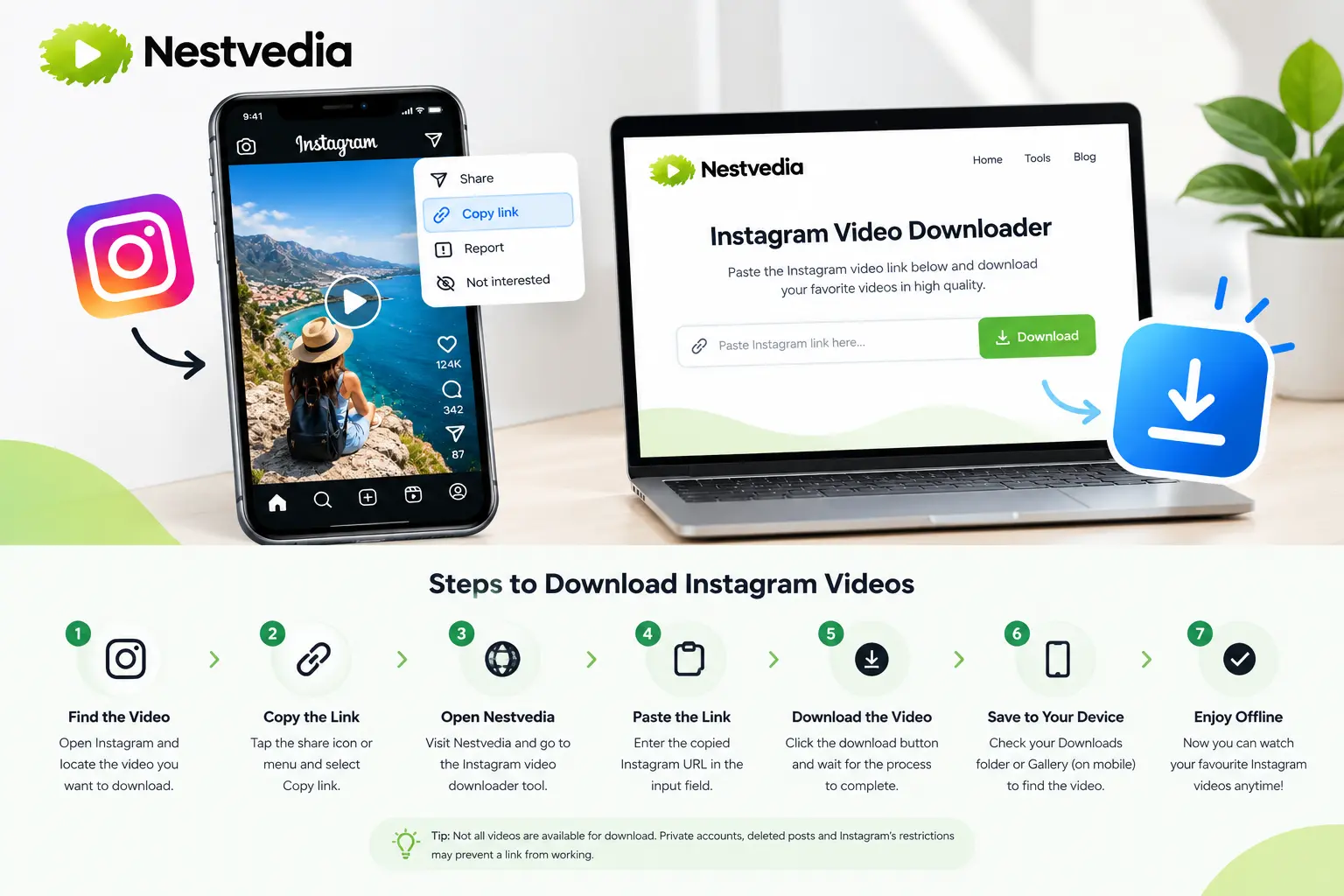
Downloading a supported Instagram video on a desktop or laptop is often straightforward because you can copy the link and use a browser-based tool.
Follow these steps:
-
Open Instagram in your desktop browser.
-
Find the public video you want to save.
-
Open the post and copy its URL from the browser address bar or sharing menu.
-
Open Nestvedia and navigate to the Instagram video downloader, if available.
-
Paste the URL into the input field.
-
Start the process and follow the instructions shown.
-
Save the resulting file to your preferred folder.
Once the download finishes, open the file to confirm that it plays correctly.
This method can be convenient for people who want to watch videos offline, keep personal reference material, or organise permitted content on their computers. However, availability depends on the downloader, the video, and Instagram's current restrictions.
Instagram's Save Feature vs Downloading a Video
Many users search for how to save video from Instagram without realising that saving a post and downloading a video are two different things.
| Feature | Instagram's Save option | Online video downloader |
|---|---|---|
| Saves a post for later | Yes | Not its main purpose |
| Stores a separate video file | Generally no | May do so for supported videos |
| Requires an internet connection to save a bookmark | Yes | Usually requires internet access |
| Lets you organise saved posts inside Instagram | Yes | Depends on your device and file system |
| Works with every post | No | No; support varies |
Instagram's Save option is ideal when you simply want to revisit a recipe, tutorial, or interesting Reel later. In contrast, a compatible online tool may be more suitable when you need a video file for offline viewing.
Remember that downloading a file does not give you ownership of its content or permission to republish it.
Can You Download Instagram Videos in HD?
Video quality depends on the original upload, Instagram's delivery of the content, and the capabilities of the downloader.
Some tools may provide a higher-quality file when the source allows it. Nevertheless, an online downloader cannot reliably create genuine HD detail that was not present in the original video.
For better results, consider these tips:
-
Start with a video that plays clearly on Instagram.
-
Use the original post link rather than an unrelated or shortened URL.
-
Choose a quality option only if the tool genuinely offers one.
-
Check the downloaded file before sharing or storing it.
-
Avoid websites that promise impossible quality improvements or require suspicious software installations.
If the video looks blurry after downloading, the source quality or the available file may be responsible.
Common Instagram Video Download Problems and Fixes
Sometimes, you may follow every step correctly and still be unable to download a video. The table below covers common problems and practical solutions.
| Problem | Possible reason | What to try |
|---|---|---|
| The link is not working | Incorrect or incomplete URL | Copy the link again from the original post |
| The video cannot be found | Post deleted or account restricted | Check whether the post is still accessible |
| Downloading does not start | Browser or tool issue | Refresh the page and try again |
| The file will not play | Unsupported or incomplete file | Download again and check the file type |
| The video is missing from your gallery | Browser saved it elsewhere | Check Downloads or the Files app |
| A private video will not download | Privacy restrictions | Respect the account's privacy settings |
| Too many pop-ups appear | Untrustworthy website | Close the page and use a reputable service |
If the problem continues, try another browser or check your internet connection. Avoid entering your Instagram password into third-party downloading websites.
Is It Safe to Download Instagram Videos Online?
Online tools can be convenient, but you should still consider security and privacy before using them.
First, avoid services that ask for your Instagram login credentials just to process a public video link. Second, do not install unknown applications, browser extensions, or executable files simply because a website recommends them.
Also, check whether the website redirects you to unrelated pages or displays suspicious download buttons. A genuine download should not require you to reveal your password or payment details without a clear and legitimate reason.
Finally, respect copyright, creator permissions, and Instagram's terms. Download only content you are permitted to save. Before reposting a video, obtain the creator's permission where required and give appropriate credit.
FAQ'S
How can I download Instagram videos for free?
You can use Instagram's built-in saving feature to bookmark posts. If you need a separate video file, a browser-based Instagram downloader may work with supported public video links. Availability and features vary between tools.
How do I download video from Instagram without an app?
Copy the link of an accessible video, open a compatible online downloader in your browser, paste the link, and follow the download instructions. This method avoids installing a dedicated app, although not every video will be supported.
How to save IG videos to my phone gallery?
If a supported online tool provides a downloadable file, save it through your browser. On Android, check Downloads or Gallery. On iPhone, check the Files app and use the available save option if you want to move the video to Photos.
Why can't I download an Instagram video?
The post may be private, deleted, restricted, or unsupported by the downloader. An incorrect link, browser issue, or temporary service problem can also cause an error. Copy the link again and check whether the original video is accessible.
Can I download Instagram Reels as well as regular videos?
Some Instagram downloaders support both Reels and regular public video posts. However, features differ between services, so check the tool's supported content types before attempting a download.
Final Thoughts
Learning how to download video from Instagram becomes easier when you understand the difference between bookmarking a post and saving a separate video file. Instagram's built-in Save feature is useful for revisiting content, while a compatible online downloader may offer another option for supported public videos.
Whether you want to learn how to save the video from Instagram on your phone or download Instagram videos on a computer, start by copying the correct link and following the instructions for your device. If a download fails, check the link, browser, and availability of the original post.
Visit Nestvedia to explore its available video-downloading tools and choose the option that suits your needs. Always respect privacy, copyright, and the creator's permissions when saving or sharing content.
Continue reading