Facebook Reel Downloader: Download Reels Online
A Facebook Reel Downloader helps you save publicly available Facebook Reels to your device so you can watch them later, even when you are offline. Whether you want to keep a useful tutorial, revisit a cooking video, or save an interesting public clip for personal reference, Nestvedia offers a browser-based way to download supported videos without installing extra software.
However, downloading a Reel is not always as simple as pressing a button. Facebook privacy settings, link formats, device compatibility, and copyright restrictions can affect the process. Therefore, this guide explains how to download Facebook Reels online, how to save them on Android, iPhone, and desktop, and what to do when a download fails.
What Is a Facebook Reel Downloader?
A Facebook Reel Downloader is an online tool that helps users retrieve video files from supported Facebook Reel links. Instead of recording your screen or installing an unfamiliar application, you can copy a Reel's URL, paste it into a compatible downloader, and download the available video.
For example, you might want to save a public educational Reel to review its instructions later. Similarly, you could keep a permitted reference clip for a personal project.
Nestvedia provides a browser-based Facebook video downloader that can process supported public Facebook video links, including some Reels. Availability depends on whether Facebook makes the video accessible through its public URL.
How Does a Facebook Reel Downloader Work?
The process generally involves three steps:
-
Copy the Reel link: Open the Reel on Facebook and select the option to copy its link.
-
Process the URL: Paste the link into an online Facebook Reels downloader and request a preview.
-
Save the video: If the Reel is supported, use the available download option to save the file to your device.
Nevertheless, no downloader can guarantee that every Facebook Reel will work. Private content, expired links, login restrictions, and changes to Facebook's platform may prevent retrieval.
How to Download Facebook Reels Online With Nestvedia
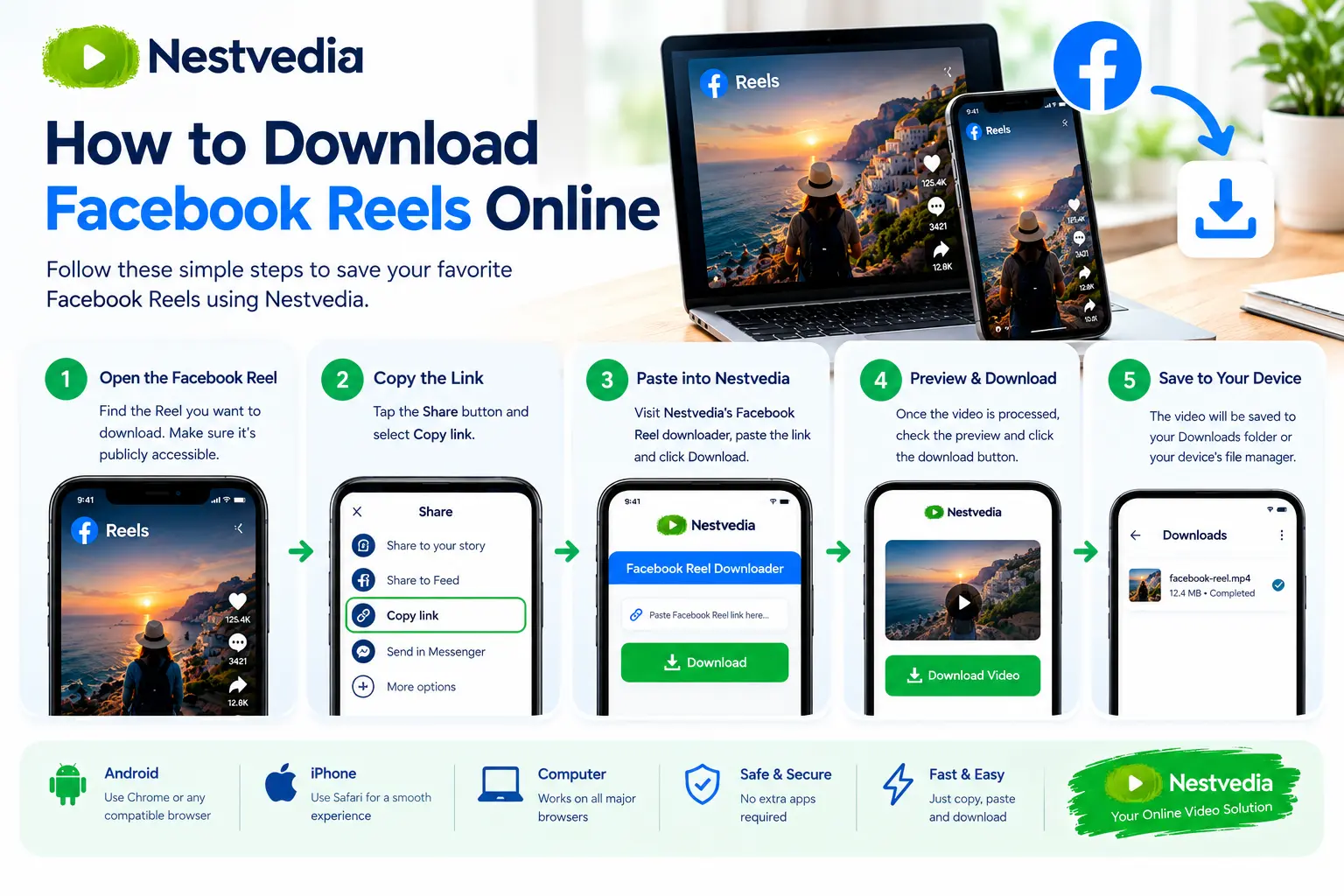
If you want to download a supported public Reel, follow these straightforward steps.
Step 1: Open the Facebook Reel
First, open Facebook in your browser or mobile application. Find the Reel you want to save, and make sure you can access it legitimately.
Whenever possible, check that the Reel is publicly accessible. If Facebook requires permission to view it, an external downloader may not be able to retrieve it.
Step 2: Copy the Facebook Reel Link
Next, locate the Share option on the Reel.
-
On Android: Open the Reel, tap Share, and choose Copy link.
-
On iPhone: Open the Reel, tap Share, and select Copy link.
-
On desktop: Open the Reel and copy its URL using the sharing menu or browser address bar.
The wording and placement of these options can vary with Facebook's interface.
Step 3: Paste the Link Into Nestvedia
Now visit the Nestvedia Facebook downloader. Paste the copied URL into the video link field and select the option to retrieve the video.
After that, wait for the tool to process the link and display a preview, if supported.
Step 4: Download and Save the Reel
Finally, check that the preview matches the Reel you intended to save. Use the available download option and allow the file to finish downloading.
Your browser may save the video automatically or ask you where to store it. Once the download finishes, open your Downloads folder or your device's file manager to locate the video.
How to Download Facebook Reels on Different Devices
The basic process is similar across devices. However, the final saving step can differ depending on your browser and operating system.
Download Facebook Reels on Android
Android users can usually save supported videos through Chrome or another compatible browser.
-
Open Facebook and find the Reel.
-
Tap Share and select Copy link.
-
Open Nestvedia's Facebook downloader in your browser.
-
Paste the URL and request the video preview.
-
If the video is available, select Download.
-
Open your Downloads folder to find the saved file.
If the video does not appear immediately, check the browser's download notifications. Also, ensure that your device has sufficient storage space.
Download Facebook Reels on iPhone
On an iPhone, Safari provides a convenient way to access online video tools without installing another application.
-
Open the Facebook app and locate the Reel.
-
Tap Share, then choose Copy link.
-
Open Safari and visit the Nestvedia Facebook downloader.
-
Paste the link and process it.
-
Select the download option if the Reel is supported.
-
Check Safari's Downloads list or the Files app for the video.
Depending on the file and your iOS version, you may need to move the downloaded video into Photos manually. Therefore, do not assume that every downloaded file automatically appears in your camera roll.
Download Facebook Reels on a Computer
Downloading a supported Reel on a desktop or laptop is generally straightforward.
-
Open Facebook in your browser.
-
Navigate to the Reel you want to save.
-
Copy its URL from the sharing menu or address bar.
-
Visit Nestvedia's Facebook downloader.
-
Paste the URL and retrieve the available preview.
-
Download the file and locate it in your computer's Downloads folder.
For easier file management, rename the video descriptively after downloading it, provided you have the right to keep the content.
Benefits of Using an Online Facebook Reels Downloader
An online tool can make saving supported videos more convenient. Nevertheless, you should choose a service carefully and understand its limitations.
Key benefits include:
-
No extra application: A browser-based tool avoids the need to install dedicated downloader software.
-
Multiple device options: You can access an online tool from a compatible phone, tablet, or computer.
-
Convenient offline viewing: A saved video can be useful when you have limited internet access.
-
Easy link-based workflow: Copying and pasting a URL is usually simpler than recording your screen.
-
No added branding from Nestvedia: The service does not stamp its own logo onto the saved video file.
However, downloading does not grant ownership of a video or permission to republish it. Furthermore, the actual availability and quality of a downloaded file depend on the source video and the tool's supported functionality.
Why Is My Facebook Reel Not Downloading?
Sometimes, a Facebook Reels downloader may fail to process a link. Fortunately, several common issues have simple explanations.
| Problem | Possible solution |
|---|---|
| The Reel is private | Use a publicly accessible Reel or request permission from its creator. |
| The link is incorrect | Reopen the Reel and copy its link again. |
| Facebook requests a login | The video may not be publicly accessible outside Facebook. |
| The preview does not load | Refresh the page and try again later. |
| The download does not start | Check your browser settings, available storage, and download permissions. |
| The wrong video appears | Copy the URL directly from the intended Reel and verify the preview. |
| The file cannot be found | Check Downloads in your browser or your device's file manager. |
What If the Facebook Reel Is Private?
Private Reels and content restricted to friends or closed groups cannot generally be retrieved by an external downloader without the necessary access. Nestvedia's Facebook tool is designed for supported public links, not for bypassing privacy restrictions.
Therefore, choose a public video or ask the creator to share an accessible copy. Never provide your Facebook password to a third-party downloader to overcome a login restriction.
Is It Safe and Legal to Download Facebook Reels?
Safety and copyright deserve attention whenever you save online content.
First, prefer browser-based tools that do not require unnecessary software installations or sensitive account information. Avoid suspicious pop-ups, unexpected downloads, and websites requesting your Facebook login credentials.
Second, remember that a publicly viewable Reel is not automatically free to reuse. The creator or another rights holder may own the video's footage, music, narration, or other elements.
Before downloading or using a Reel, consider these guidelines:
-
Save content only when you have a legitimate reason and the necessary rights or permission.
-
Keep downloaded videos for personal reference when permitted.
-
Ask the creator before reposting their content on another platform.
-
Obtain appropriate permission for commercial use.
-
Respect privacy, platform rules, and applicable copyright laws.
If you create content yourself, you can also keep original copies of your videos so that you do not need to retrieve them from social media later.
For more information, read Nestvedia's DMCA and Copyright Policy.
Facebook Reel Downloader vs. Facebook Video Downloader
Although these terms are closely related, users may search for them with slightly different intentions.
A Facebook Reel downloader focuses on short-form Reels, whereas a Facebook video downloader can also cover longer videos, Watch content, and videos shared in public posts.
| Feature | Facebook Reel downloader | Facebook video downloader |
|---|---|---|
| Main content | Facebook Reels | Reels and other supported videos |
| Typical use | Saving short-form clips | Saving public video content |
| Link requirement | Supported Reel URL | Supported Facebook video URL |
| Device compatibility | Depends on the tool and browser | Depends on the tool and browser |
| Private content | Not generally supported | Not generally supported |
In practice, one tool may support both types of content. Nestvedia's Facebook video downloader supports public video links and may also process Reels when Facebook exposes an accessible URL.
If you want to save videos from another social platform, you can also explore Nestvedia's Instagram video downloader for supported public Instagram content.
Frequently Asked Questions
1. What is the best Facebook Reel Downloader?
The best option depends on ease of use, device compatibility, privacy, and the types of links it supports. Nestvedia offers a browser-based tool for supported public Facebook Reels and other Facebook videos.
2. Can I download Facebook Reels online for free?
You can use Nestvedia's online Facebook downloader to process supported public video links. Availability depends on the tool's current functionality and Facebook's access restrictions.
3. Can I download Facebook Reels without an app?
Yes. A browser-based downloader allows you to process supported links without installing a separate downloader application. You still need a compatible browser and an accessible video URL.
4. Can I download Facebook Reels on an iPhone?
Yes. Copy the Reel link, open Nestvedia in Safari, paste the URL, and download the file if supported. You may then need to locate it in Files and move it to Photos.
5. Can I download private Facebook Reels?
Generally, no. External downloaders cannot retrieve content that is inaccessible through a supported public link. Respect the creator's privacy and request permission when necessary.
Final Thoughts
A Facebook Reel Downloader can make it easier to save supported public Reels for convenient offline viewing. By copying the correct link, using a browser-based tool, and checking the downloaded file, you can follow a straightforward process on Android, iPhone, or desktop.
Nestvedia helps simplify this process through its online Facebook video downloader. However, remember to respect privacy settings, protect your personal information, and obtain permission before reusing someone else's content.
Use online downloading tools responsibly, and choose a method that fits your device and the rights associated with the video you want to save.
Continue reading